
Generate leads With Google Maps
This workflow uses n8n to automate Google Maps API queries and streamline the process of collecting location-based data into Google Sheets. It extracts business information based on predefined ZIP codes and categories, organizes it into structured formats, and removes duplicates automatically.
With built-in retry logic and API handling, the workflow ensures reliable data collection even at scale. It eliminates manual effort, improves data accuracy, and enables teams to efficiently build targeted lead lists for outreach and analysis.
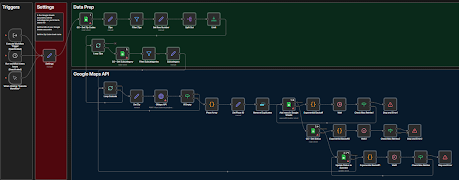
What This Template Does?
- Extracts business data using Google Maps API
- Searches locations based on ZIP codes and categories
- Collects structured information (name, address, etc.)
- Stores extracted data directly into Google Sheets
- Removes duplicate entries automatically
- Organizes data for easy filtering and usage
- Automates large-scale location data collection
- Updates records for tracking and analysis
Step-by-Step Setup Instructions
- Import workflow into n8n
- Configure Google OAuth credentials
- Connect Google Maps API (Places / Search)
- Set up Google Sheets for data storage
- Add ZIP codes or target locations
- Define business categories or keywords
- Customize workflow parameters (query, limits)
- Test API requests and data output
- Enable workflow execution (manual or scheduled)
- Monitor and update results in Google Sheets
Features
- Automated Google Maps data extraction
- Location-based search using ZIP codes
- Category-based filtering for targeted results
- Duplicate removal and data cleaning
- Structured data storage in Google Sheets
- Smart retry handling for API limits
- Scalable workflow for large datasets
- Real-time logging and status updates
- Easy customization for different use cases
Key Benefits
- Automates location-based lead extraction using Google Maps APIs
- Organizes and stores data efficiently in Google Sheets
- Removes duplicate entries and keeps data clean
- Handles API limits using smart retry and backoff logic
- Tracks and updates data automatically in real-time
- Reduces manual effort in lead generation workflows
- Enables scalable data collection across multiple regions
Requirements
- n8n automation platform (self-hosted or cloud)
- Google Maps API (Places / Search API access)
- Google Sheets account for storing extracted data
- Google OAuth credentials for secure API access
- Predefined ZIP codes or location datasets
- Basic workflow setup and API configuration in n8n
Target Audience
- Lead generation agencies collecting local business data
- Marketing teams targeting location-based outreach
- Sales teams building prospect lists from Google Maps
- Data scraping and automation specialists
- Businesses expanding into new geographic markets
- Developers building automated data pipelines